EDUARDO MARTINELLI
UNITY & C#
EXPERT DEVELOPER
Player Territories — Fog-of-War Aware Regions and Centroid Placement
By Eduardo Martinelli | April 10, 2026 | 0 min read
In this devlog, we extend our region system to support player territories — distributing land tiles across players, introducing fog-of-war-aware label rendering, and computing label positions dynamically from visible coordinates.
In a previous post we built a generalized UI component capable of rendering named labels on the planet's surface,
and used it to visualize tectonic plates. The Regions module was designed from the start to be reusable. Now we will expand its usage even further with player territories —
the land each player owns after the map is divided at the start of a match, like in Risk, and the land players will fight over.
What we'll cover:
- Introducing a
SettingsMatchconfig class and a newPlanetLayervalue - Building
PlayerMappingto own territory data - Wiring territory/player names through the existing
RegionMappingsystem - Making label positions fog-of-war aware
- Computing label anchor points from visible coordinates with centroids
Setting Up Match Config
Our game has no gameplay yet — that's the goal we're working toward. The first brick of this wall is adding a new SettingsMatch data class that captures how a match is configured before it starts. For now it holds two things: how many players are in the game, and whether the map should be divided between them at generation time.
[System.Serializable]
public class SettingsMatch
{
    [Tooltip("Number of players in the match.")]
    [Range(1, 10)]
    [SerializeField] private int _playerCount = 2;

    [Tooltip("Divide the map between players at the start of the match.")]
    [SerializeField] private bool _startWithTerritories = false;

    public bool StartWithTerritories { get => _startWithTerritories; }
    public int PlayerCount { get => _playerCount; }
}
The [Tooltip] attribute is a built-in feature in Unity that lets you attach to serialized fields a small help message in the Inspector when you hover over that field. It is very useful for configuration files as you are prototyping and tweaking values, and it doesn't require any extra work to set up. Use carefully so you avoid bloating your code with too many.
In the future SettingsMatch could be a ScriptableObject, so different rule presets can be mixed and matched with game modes and planet generation settings. For now, a plain serializable class is enough.
Next, we add PlayerOwned to the PlanetLayer enum. So that we can transform this into a UI button and allow the player to visualize territory boundaries in-game.
This is what the full enum looks like now:
public enum PlanetLayer
{
    Base = 0,
    Temperature = 1,
    Humidity = 2,
    Evaluation = 3,
    PlateTectonics = 4,
    PlayerOwned = 5
}
Setting Up Necessary Data
Getting the Land Tiles
Only land tiles are distributable — water doesn't belong to anyone at the start. So we go into GeographyMapping, our geography data class, and add a method that returns all tiles above the water level:
public class GeographyMapping : MonoBehaviour
{
    private Dictionary<Vector3, float> heightMap;

    /// <summary> Get all tiles above water level </summary>
    public List<Vector3> GetLandTiles(float waterLevel)
    {
        List<Vector3> landTiles = new List<Vector3>();
        foreach (var kvp in heightMap)
        {
            Vector3 coord = kvp.Key;
            float height = kvp.Value;
            if (height > waterLevel)
            {
                landTiles.Add(coord);
            }
        }
        return landTiles;
    }
    (...)
}
You might wonder if this should be a property instead. It isn't, deliberately. We don't use the observer pattern in this project — I've expressly prohibited it.
Fewer patterns means more consistency and fewer failure modes. This is a function, and it gets passed to the managers that need it via Func<>. Nothing holds a direct reference to GeographyMapping apart from it's direct parent class.
Where Should Territory Data Live?
In data-oriented programming, data lives where its processing happens. Territory ownership will eventually drive attacking, defending, and tile capture — so we create a dedicated PlayerMapping class to own all of it.
Whatever combat logic comes next will also live here. It might get renamed to WarMapping eventually, but that's a problem for a future post.
At a high level, PlayerMapping takes the land tiles and the player count, and distributes coordinates evenly:
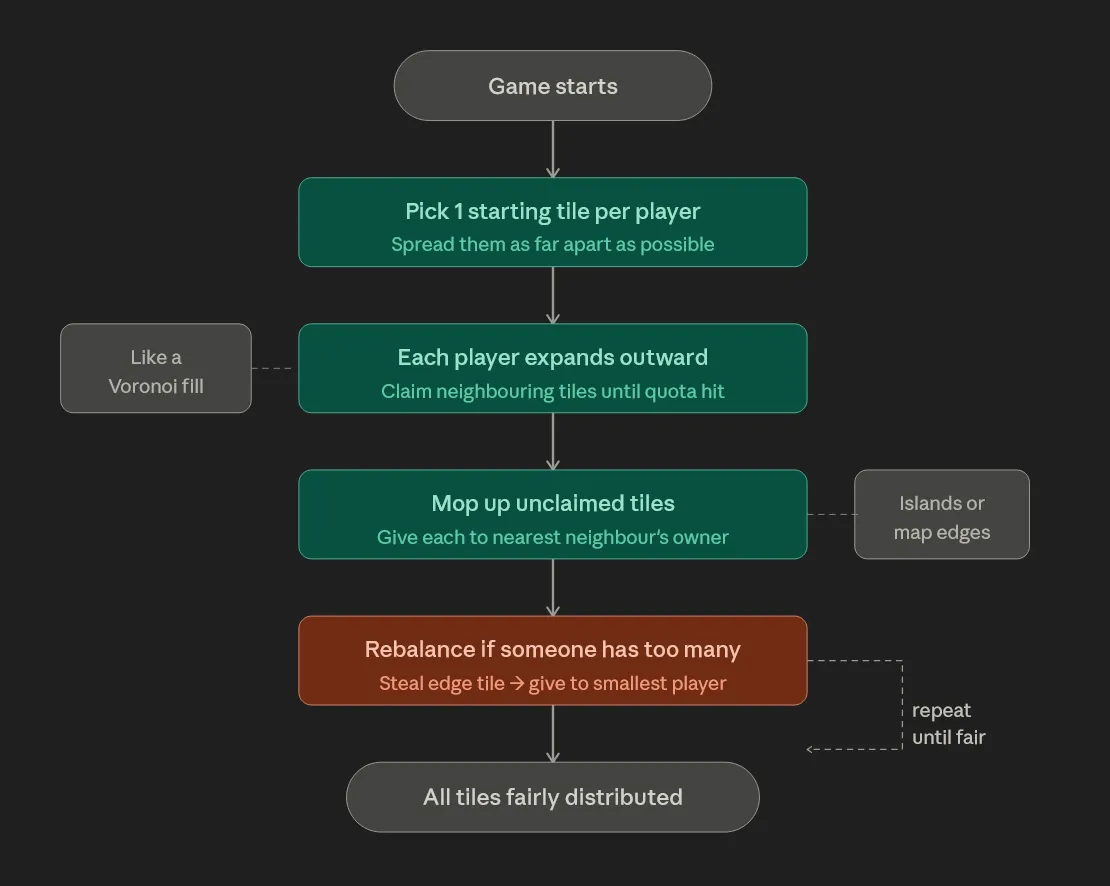
The class exposes two important fields that represent the same data in different shapes, because different systems need different access patterns:
public Dictionary<Vector3, int> CoordOwnedToPlayer
public Dictionary<int, HashSet<Vector3>> PlayerToCoords
Both exist because our systems need different formats of this data. This may be worth refactoring one day, but refactoring is only worth doing if it helps you reach the end goal faster — and right now, it doesn't.
Naming the Territories
With coordinates assigned to players, the last missing piece is names. We already have RegionMapping from the previous post mentioned.
We add a new method to it — SetPlayerRegions — that follows the exact same pattern as SetPlateRegions. Players don't support custom names yet, so they're named Player 1, Player 2, and so on. Player 1 is assumed to be the human player.
RegionData is the data class from which our name GUI emerges. We read it's data and render it's name on a certain position using a World Space Canvas. It has also been updated slightly. The Position field is gone — I'll explain why shortly
[System.Serializable]
public class RegionData
{
    public int Id;                       // Found in the respective data mapping class
    public string Name;                  // Name generated for the region
    public HashSet<Vector3> AllCoords;   // All coordinates belonging to this region
    public float GradientValue;          // Normalized value for color gradient lookup
}
GradientValuereplaces the cachedColorfield. Rather than storing a color per region, we store a normalized float and let the UI resolve it from a gradient at render time. Less data coupling between the mapping and the rendering.
Rendering Player Territory
When the PlayerOwned layer is toggled, the planet's tile colors are driven by CoordOwnedToPlayer, and UIRegions reads from RegionMapping to place the name labels — the same flow used for tectonic plates. Here's what it looks like in sandbox mode with all tiles visible:
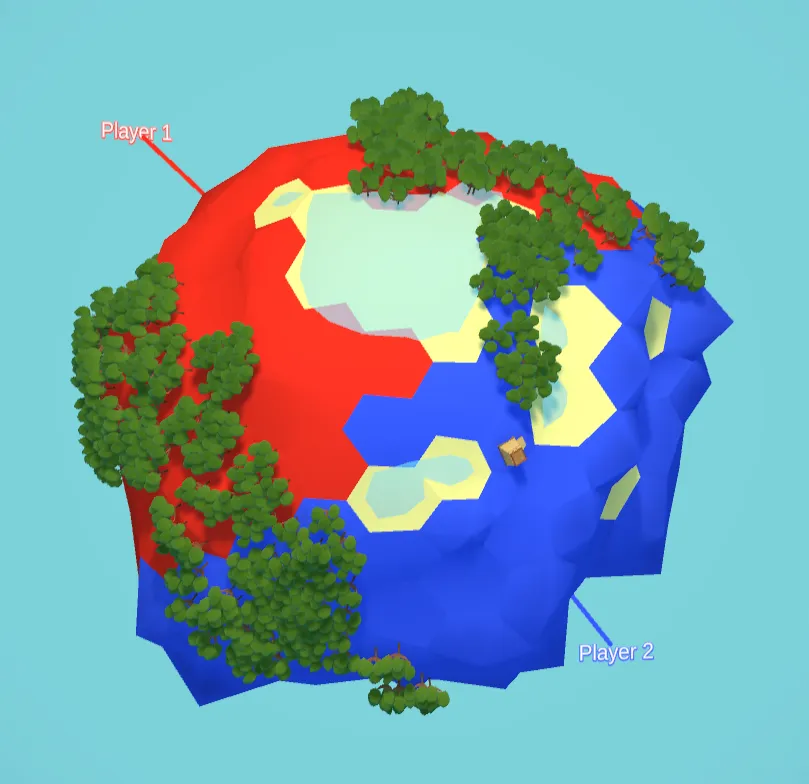
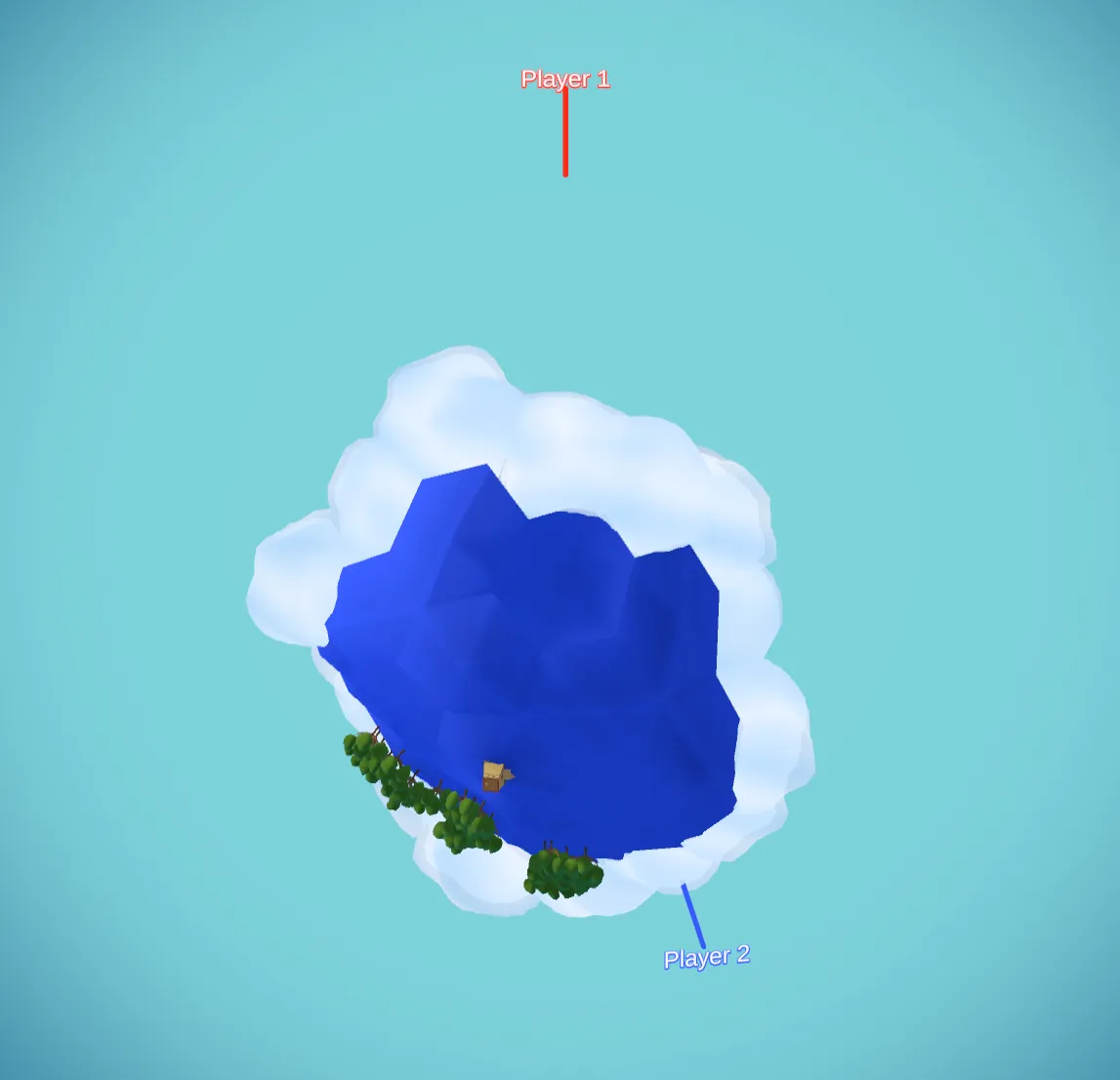
It looks great in sandbox. Switch to a regular match with fog of war, and two problems surface immediately.
First, the player can't see the full extent of their own territory — we never told the game to reveal the tiles that belong to you at the start. Second, region names are still rendered for areas outside your vision. I want names to appear only when you can see at least one tile of a region, and the label position should shift to the center of your visible tiles rather than the center of the whole region.
Fixing Territory Visibility
The first problem is straightforward. Data-oriented design makes it almost trivial: we pass CoordToPlayer into FogMapping, which already has all the functions it needs to reveal cells. One parameter, one call:
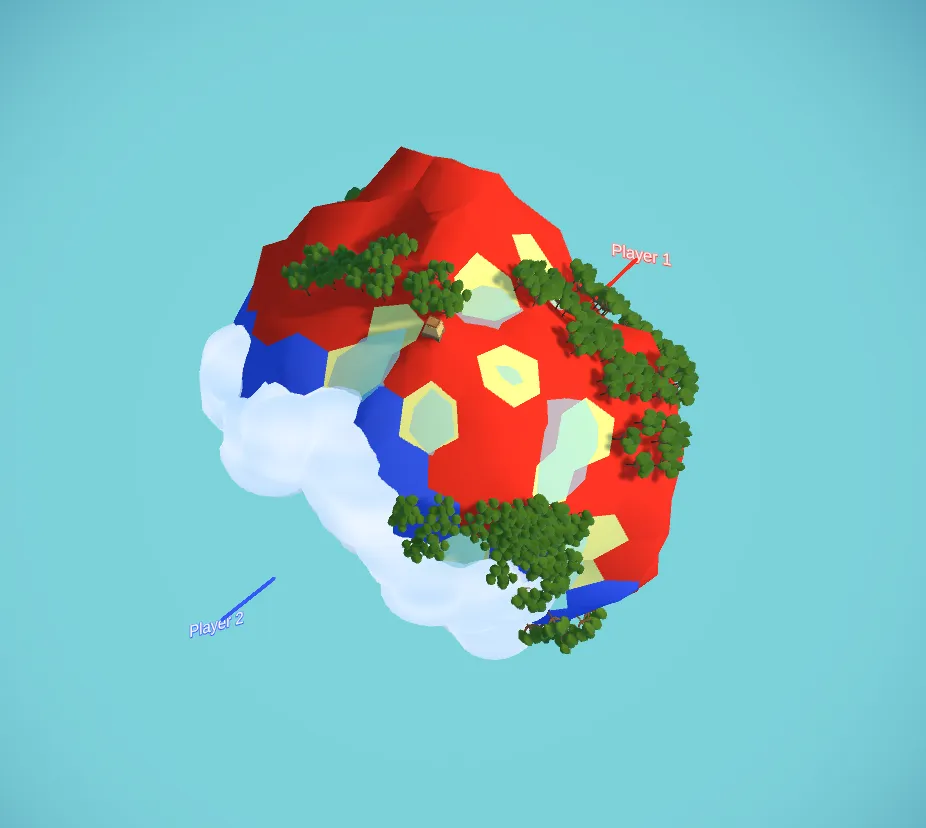
Owned tiles are now visible from the start. No new systems, no event wiring, just data being passed down the hierarchy. DOP ILY.
Dynamic Label Positions
This is why Position was removed from RegionData. A static center coordinate stops making sense once visibility is dynamic — the "center" of what you can see changes as the game progresses. We need to compute it on the fly.
In UIRegions, the main RenderNames method now accepts an optional HashSet<Vector3> visibleTiles parameter. When it's provided, each region's coordinates are filtered down to only the ones the player can currently see:
// Filter region coords to only those present in visibleTiles
HashSet<Vector3> visibleRegionCoords = new HashSet<Vector3>();
if (visibleTiles != null)
{
    visibleRegionCoords = new HashSet<Vector3>(
        region.AllCoords.Where(c => visibleTiles.Contains(c))
    );
}
visibleTiles is just PlayerToCoords[0] — the set of tiles belonging to player 1, which is the set the player can see. The manager hierarchy passes it down without creating any direct dependencies between systems.
With the filtered set in hand, we need to find the best tile to anchor the label to. The right approach is to find the tile closest to the centroid of the visible coordinates. I added a static method to VectorUtility for this:
public static class VectorUtility
{
    /// <summary>
    /// Get the closest coordinate to the centroid of a set of points.
    /// Used to place region name labels at the visual center of visible tiles.
    /// </summary>
    public static Vector3 GetClosestToCentroid(HashSet<Vector3> points)
    {
        if (points == null || points.Count == 0)
            return Vector3.zero;

        // Get centroid
        float x = 0f, y = 0f, z = 0f;
        foreach (var p in points)
        {
            x += p.x;
            y += p.y;
            z += p.z;
        }
        int count = points.Count;
        Vector3 centroid = new Vector3(x / count, y / count, z / count);

        // Get the closest point to the centroid
        Vector3 closest = default;
        float bestDist = float.MaxValue;
        foreach (var p in points)
        {
            float d = (p - centroid).sqrMagnitude;
            if (d < bestDist)
            {
                bestDist = d;
                closest = p;
            }
        }
        return closest;
    }

    (...)
}
The label is then placed at that tile's position. We can now see clearly that the label for Player 1's territory is anchored to the center of the visible land, and as the player expands their vision, the label shifts to stay centered on what they can see:
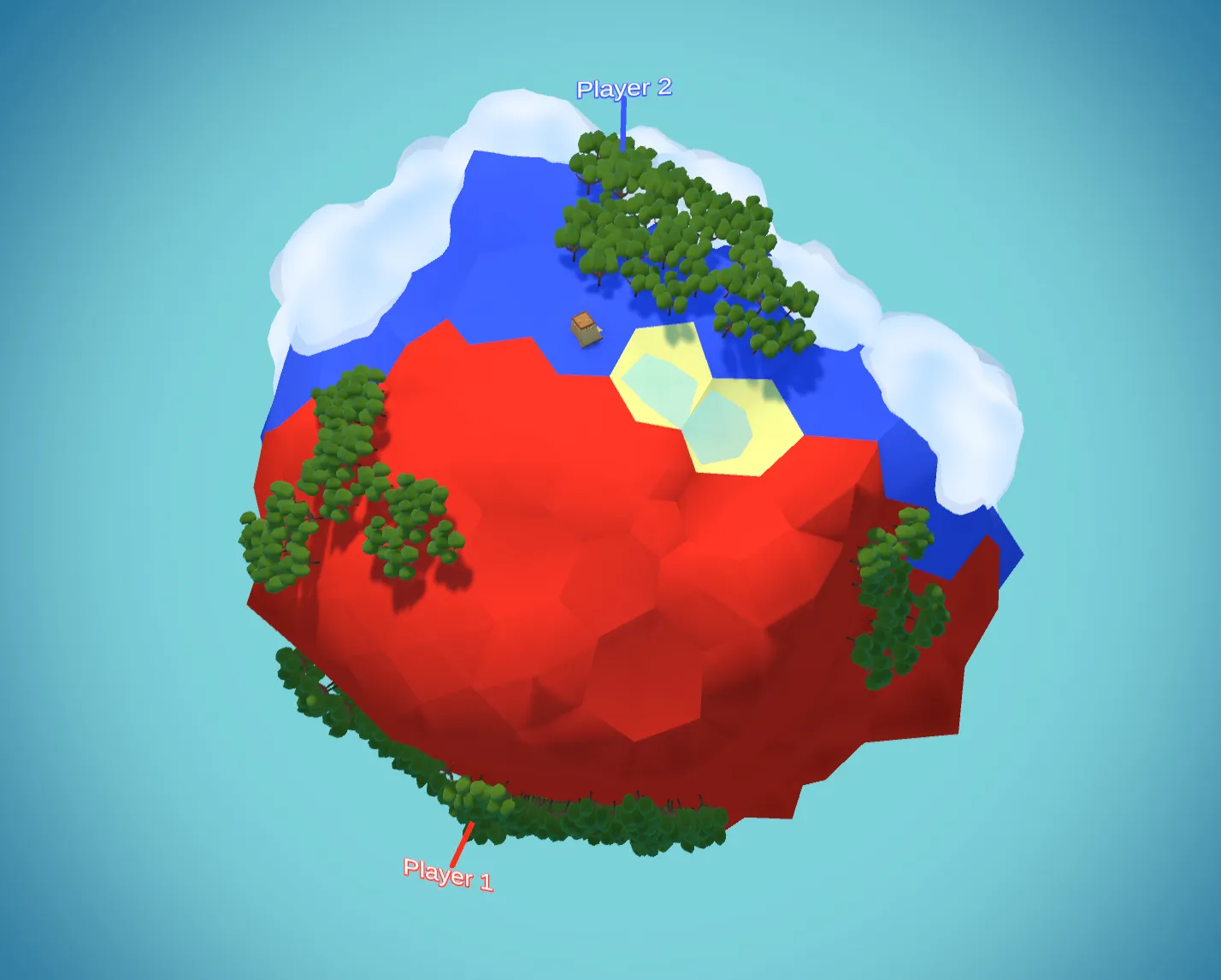
Because this logic lives in UIRegions rather than in the region data itself, it applies to every layer — including tectonic plates, which now also benefit from centroid-based placement.
I think this looks neat! It's always satisfying when a problem disappears just by passing the right data to the right pipeline.
If a project is well-organised and data is properly scoped, you can do that without too much hassle.
This is a last look for the current implementation:
What Could be Next
- Make name visualisation better — label billboards don't look great right now
- Adjust the planet layer colouring so new layers don't simply overdraw the previous one
- Implement gameplay: use
PlayerMappingto drive actual fighting logic, handling multiple players and a specialised UI component to visualise troop counts
If you found this useful, consider following along for future devlogs — I'm documenting the fun and not so fun stuff I deal with in my spare time.