EDUARDO MARTINELLI
UNITY & C#
EXPERT DEVELOPER
Visualizing Plate Boundaries — Adding a Plate Tectonics Layer to The Planet Renderer
By Eduardo Martinelli | March 31, 2026 | 0 min read
In this devlog, we add a "Tectonics" layer toggle that shades each tectonic plate a distinct color and labels it by name — making the planet's surface division actually visible.
In a previous post I walked through how my plate tectonics algorithm works. This time we're not generating plates — we're looking at them. The goal: a "Tectonics" visualization layer that shades each plate a distinct color, so you can actually see how the planet's surface is divided.
What sounds like a frontend-only task turns out to hide a couple of genuinely interesting problems. Let's get into it.
What we'll cover:
- Adding a new
PlateTectonicsenum value to the planet layer system - Transforming plate simulation data into a normalized float map for rendering
- Diagnosing and fixing a silent initialization order bug
- Seeing the tectonics layer working in-game
The Layer System
The planet renderer has a PlanetLayer enum — a list of every visualization mode you can switch between. Things like elevation, temperature, humidity. Each entry carries an icon and a color gradient used to shade the surface. It's a purely frontend concept: no simulation data lives here, just display logic.
Adding tectonics is simple enough on the surface. Drop a new enum value, assign an icon, define a gradient. Done in four lines:
public enum PlanetLayer
{
    Base            = 0,
    Temperature     = 1,
    Humidity        = 2,
    Evaluation      = 3,
    PlateTectonics  = 4
}
This is what it looks like in the editor:
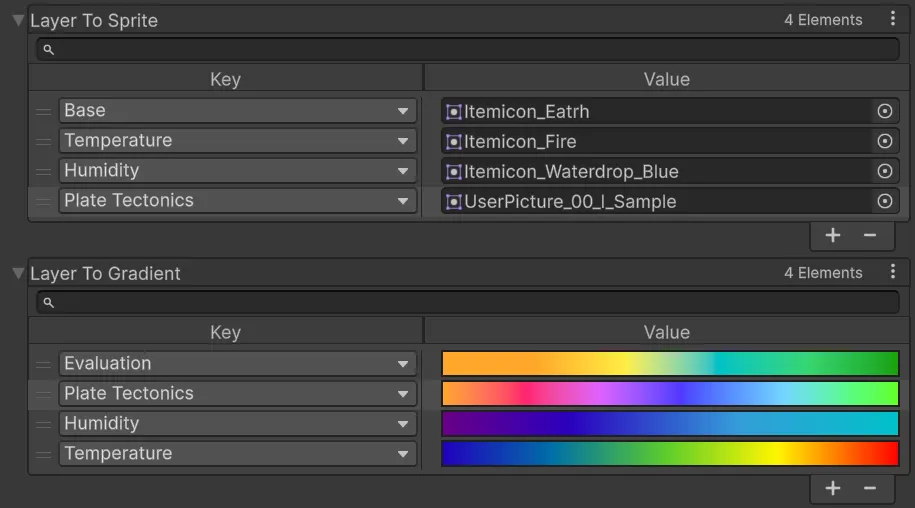
Now we need to figure out what data we will be displaying for the player.
Transforming Plate Data for Rendering
TectonicsManager stores plate data as a dictionary: each plate maps to a list of coordinates it owns. That's a natural structure for the simulation — great for lookups, great for neighbor checks. But it doesn't match the format the layer visualizer expects.
The visualizer needs every coordinate mapped to a single float between 0 and 1 in a Dictionary<Vector3, float>. That float gets evaluated against the layer's gradient to produce a color — essentially a normalized float map.
Since the whole project is data-oriented, I'd rather write a conversion function than create a special case every time the data shapes don't line up. In the visualizer class UILayers, we feed this data immediately after plate generation — take the dictionary, flip the mapping, assign each plate a normalized index value, and output a per-coordinate float map:
private Dictionary<Vector3, float> GetPlateFloatMap(
    Dictionary<Vector3, List<Vector3>> plateToCoords)
{
    int cellCount = 0;
    foreach (var kvp in plateToCoords)
        cellCount += kvp.Value.Count;

    Dictionary<Vector3, float> plateMap =
        new Dictionary<Vector3, float>(cellCount);

    float increment = 1f / (float)plateToCoords.Keys.Count;
    float currentIndex = 0;

    foreach (var kvp in plateToCoords)
    {
        float plateId = currentIndex;
        foreach (var coord in kvp.Value)
            plateMap[coord] = plateId;
        currentIndex += increment;
    }
    return plateMap;
}
Not complicated. But it's a good illustration of the friction that comes with a data-oriented approach: your simulation data and your rendering data often want to be shaped completely differently, and you have to consciously translate between them rather than letting them bleed into each other.
Fixing an Initialization Order Bug
This is the part I actually want to talk about, because it's the kind of problem that doesn't get discussed enough.
My original setup assumed a specific order: configure the UI first, generate the planet, then fire an event passing layer colors into the UI. That worked fine for elevation and temperature, which are generated as part of planet creation. Tectonics broke that assumption immediately.
To visualize plates, I need to reach into TectonicsManager after the planet exists — which means the planet has to be ready first. But the UI event that assigned base colors expected to fire during generation, before the planet was fully set up.
Initialization order bugs are fun (irony) because nothing crashes. The code just quietly does the wrong thing at the wrong time.
The fix was to extract a new function from the planet: SetBaseColors(). Instead of colors being baked in during generation, this function can be called explicitly once the planet is ready. The new order is: generate planet → set up UI → call SetBaseColors(). Clean, not as elegant as before, but at least explicit.
This exposes one more function to the rest of the application — a small cost worth paying. In a project this size, every bit of exposed surface area is a place where future-you might make a wrong assumption. These decisions compound. A handful of careless initialization quirks, a few implicit dependencies, some undocumented ordering requirements — and suddenly you're debugging a katamari of bugs that grows larger every time you touch it.
Extracting SetBaseColors() keeps the intent explicit. Anyone reading this code in six months will immediately understand: the planet is ready, the UI is ready, now we're wiring the colors. That kind of clarity is worth more than you'd think — until it saves you a whole day of code archaeology on a random Friday.
After fixing this and feeding the UI with the converted data, we can now visualize plate tectonics in-game. Huge W. (I didn't have an icon ready yet, so we're using a joyful kid icon for now. Small L.)
What's Next
Next time we're building a reusable labelling system that can place names at any point on the planet's surface — then wiring it up to our tectonic data to finally show plate names in-game.
If you found this useful, consider following along for future devlogs — I am documenting the fun and not so fun stuff I deal with on my spare time.