UNITY & C#
EXPERT DEVELOPER
CPU Caches And Memory Access
By Eduardo Martinelli | July 30, 2026
Understanding how our computers access memory was one of the most basic yet effective lessons I learned in programming.
A few years ago this concept would have gone completely over my head. Like most developers, I learned programming on my own, mostly by building things and figuring out why they didn't work.
But I believe there isn't a concept that can't be understood. The more you learn about how modern computers actually work, the more you realize that achieving good performance can be simple.
Performance can drastically be improved by understanding how memory is organized; how processors access data; and how simple changes can have a huge impact on processing speed.
In this post we'll talk about how improving CPU memory access can increase performance. We'll also cover some concepts that will help us minimize execution times such as:
- Pointer Dereferences
- Pointer Chasing
- RAM Latency
Introduction
It all started when I published a game called North Shore. Which you can play here. It's a quick little play, similar to Risk, and with different AI personalities.
At the time I was just experimenting with larger amounts of data. Making a game through procedural generation instead of placing objects one by one.
The game worked great first try on my machine. Said any developer ever.
Tragically when I uploaded it to Itch.io on WebGL the game was unplayable as the AI would take as much as 20x longer to calculate its turn. It was painfully slow.
There was no Chat GPT or whatever agents to read through my code and teach a youngster how to code properly. So I did what anyone would do; I just changed a bunch of random things and hoped for the best. And to my surprise one of them worked.
You see, I was writing object-oriented code. I didn't even know what this meant at the time but I had encapsulated all my data into a Cell type and stored them into an array.
public Cell[] Cells;

public class Cell {
	public float AttackMultiplier;
	public float DefenseMultiplier;
	public int TroopAmount;
}
Each cell contains its variables and methods.
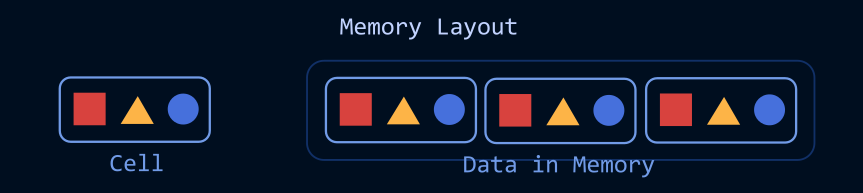
And is processed as such:
public void AITurn()
{
	int cellCount = GameManager.Instance.MapManager.Cells.Length;
    for (int i = 0; i < cellCount; i++) {
	    Cell cell = GameManager.Instance.MapManager.Cells[i];
	    (...)
	}
}
Even for a newbie like I was I still smelled something fishy looking at that for each loop. The multiple GameManager.Instance.MapManager references did not belong there. It seemed too big. I had no reasoning behind though. But I still changed it to this:
public void AITurn()
{
    var cells = GameManager.Instance.MapManager.Cells;

    for (int i = 0; i < cells.Length; i++)
    {
        var cell = cells[i];

        // Do something
    }
}
Surprisingly, this change immediately had a positive impact on my game's performance, apart from the increased readability.
Yet, I had no idea it was showing me crucial concepts I had not yet grasped. So let's talk about it!
Shortening Distances In Memory
Why does the code change mentioned makes any difference if we are accessing the same data?
We have to think about pointers.
In the code we looped and traversed data through a chain of pointers as defined by:
GameManager→Instance→MapManager→Cells
Each reference in the chain meant the processor had to constantly follow other object references before reaching the data it needed.
On some platforms the compiler recognizes that
Cellsdon't change and cache it effectively so this is usually not a problem.
But we are in WebGL. And as it is not the most well performing platform, every iteration seemed to force the CPU to traverse multiple object references every iteration.
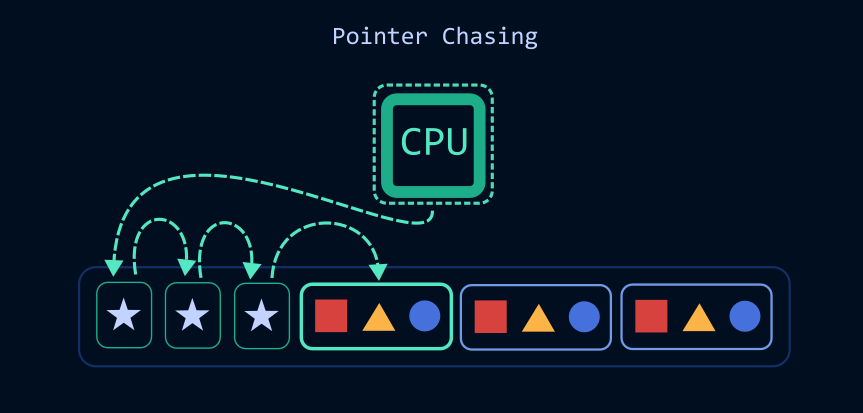
When we follow a reference to get to an object or reference we call it pointer dereference.
A pointer deference, or reference dereference, is simply the act of following a reference to access the object it points to. Here is a good read about dereference in C++.
But if you have too many dereferences in the way of your data you are doing something called pointer chasing.
When we cached Cells
var cells = GameManager.Instance.MapManager.Cells;
We reduced pointer chasing in our application.
By caching our data once we avoided the overhead of constantly accessing a long chain of nested references. Instead directly access the data we need.
But despite the performance gains; this was such a simple game that I thought it should run blazing fast. But it wasn't.
So not long after I found myself reading about pointers in C++ and inevitably learned why.
Whilst I thought the Cells array provided us direct access data in each Cell that was not the case.
public Cell[] Cells;
This is because Cell is a class, and classes are a reference type. The Cells array does not store the Cell objects themselves. It stores references to them. Which means dereferencing still happens each time we access a cell.
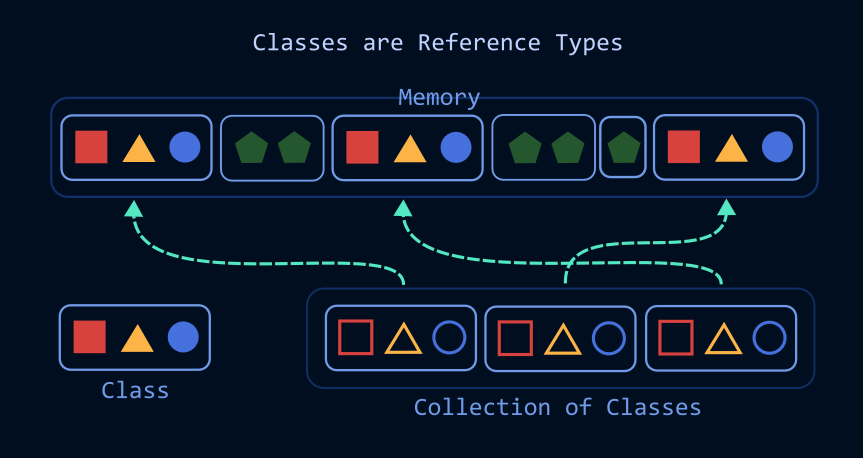
Constantly following references through memory is often referred to as pointer chasing. That's when our data is scattered throughout memory rather than stored close together, making it much harder for efficient caching to happen.
If Cell had been a struct instead of a class, the array would store the Cell values directly rather than references to them. On constrained platforms this can have a significant impact on performance.
Also scattered data slows software down. Our fastest processor's caches will have trouble managing memory effectively and we might have to access RAM memory more often. We don't want that because CPUs are much faster than RAM.
So changing our Cell class into a struct greatly improves iteration speed:
public struct Cell {
	public float AttackMultiplier;
	public float DefenseMultiplier;
	public int TroopAmount;
}
It seems like reducing the hoops our code needs to jump through every frame noticeably improves execution speed.
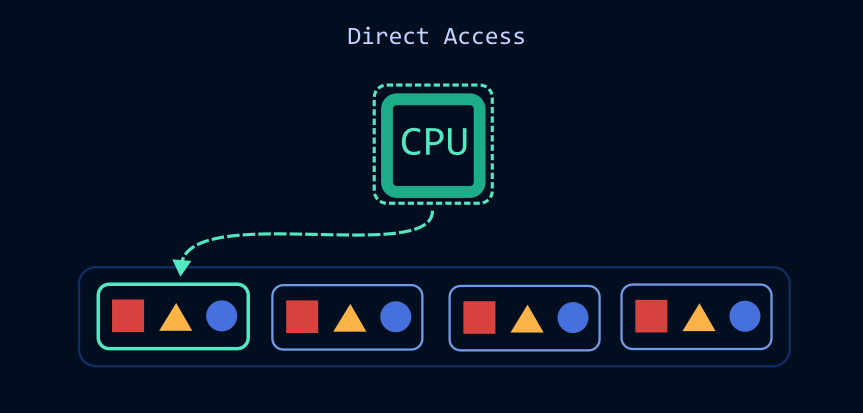
But why?
RAM Latency
Our CPU cores execute instructions in just a few clock cycles. A clock cycle is a unit of time used by our CPU to synchronize its actions. Every tick of our processor's clock is an opportunity for it to do work.
Clock cycles are measured in Hertz. Modern processors are mostly measured in Gigahertz:
- Hertz (Hz) = one clock cycle per second.
- Kilohertz (kHz) = 1,000 cycles per second.
- Megahertz (MHz) = 1 million cycles per second.
- Gigahertz (GHz) = 1 billion cycles per second.
Our processor can execute instructions in about 3-5 cycles in its faster caches. That's due to the CPU's L1, L2, and L3 caches. We'll talk more about it in another post, but basically they provide our computer's cores the data they need.
Here is an actual comparison of latency done by Cornell University:
- L1 Cache: ~4 CPU cycles
- L2 Cache: ~14 CPU cycles
- L3 Cache: ~50–70 CPU cycles
- RAM: ~200 CPU cycles
When I said that CPUs are faster than RAM I wasn't lying. But maybe I understated how much so.
Memory in RAM takes significantly more time to get to our processor. It may take up to 50x more. And that is the exact reason why we must avoid unnecessary loitering in our RAM memory.
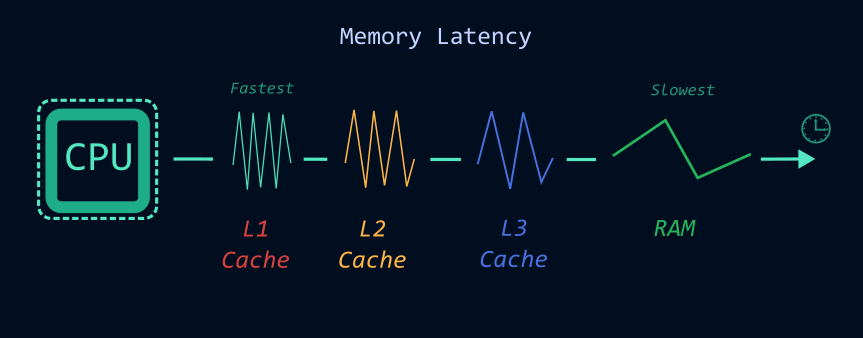
If you find yourself in an unoptimized platform every pointer dereference may count. A mere trip from a pointer to another in a different location in RAM memory could add 50x more cycles per dereference! So avoiding pointer chasing is crucial and foundational to any programmer.
Modern CPUs are incredibly fast. So fast I don't believe humans truly appreciate how magical it is. Because of this performance has become less about how fast your algorithm runs and more about how your memory is accessed; how it is laid out; how cache-friendly your code is; and so on.
That is why I've been motivated to write and share more about what I know. I want to demystify and show you how to apply these in a real project.
Our world is becoming increasingly high-level, and for a good reason. But we need to remember our code still runs on physical hardware.
Understanding how your code interacts with the hardware beneath it is one of the most valuable skills a software engineer can have when developing performance-critical applications.